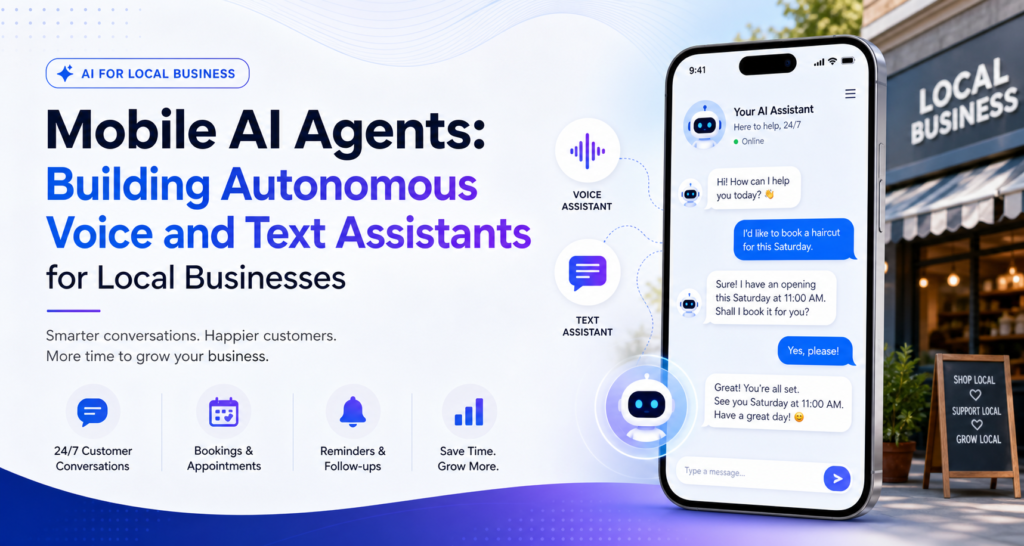
Move past copy-pasting prompts into ChatGPT. Learn how to build autonomous AI agents that run 24/7 on WhatsApp and Instagram , booking appointments, qualifying leads, and answering customers for local businesses, entirely from your phone.
Table of Contents
- Introduction: The Shift From Prompting to Building
- What Makes an AI Agent Different From a Chatbot
- The Local Business Opportunity Nobody Is Selling Yet
- The Core Building Blocks of a Mobile AI Agent
- Tool One: Flowise — Visual Agent Building on a Phone
- Getting Set Up
- Connecting an LLM to Business Data
- Designing the Conversation Flow
- Tool Two: Voiceflow — Voice-Enabled Agents Without Code
- Building the Conversation Tree
- Adding Voice Capability
- Connecting Your Agent to WhatsApp
- Connecting Your Agent to Instagram
- Feeding Your Agent Real Business Data
- Building an Autonomous Appointment-Booking Bot
- Building a 24/7 Lead-Generation Bot
- Testing Your Agent Like a Real Customer Would
- Pricing This as a Service to Local Businesses
- Common Mistakes That Kill Trust in an AI Agent
- A 7-Day Starter Plan
Introduction: The Shift From Prompting to Building
Most people’s relationship with AI stops at typing a question into ChatGPT and reading the answer. That’s prompting useful, but it ends the moment you close the tab. An agent is different: it’s a system that keeps running without you, connected to real tools, real data, and a real customer on the other end, day and night, whether you’re asleep, at another job, or handling a different client entirely.
This is the actual shift happening right now in small business automation, and almost nobody selling “AI prompting” courses is teaching it. The opportunity isn’t in knowing clever prompts. It’s in knowing how to wire an LLM into a business’s actual data and actual customer channels — WhatsApp and Instagram, specifically, since that’s where the vast majority of local commerce across Ghana, Nigeria, Kenya, and the rest of the continent already happens.
This guide walks through exactly how to build that, from a phone, using visual no-code tools that don’t require you to write a single line of Python.
What Makes an AI Agent Different From a Chatbot
It’s worth being precise about the difference, because the two get sold interchangeably and they are not the same thing.
A traditional chatbot follows a fixed decision tree: “Press 1 for hours, press 2 for location.” It cannot handle a question outside its scripted branches, and it has no memory of what was said two messages ago.
An AI agent is built around a large language model (LLM) , the same underlying technology behind ChatGPT or Claude — combined with:
- Access to real data (a business’s price list, service menu, FAQ document, or booking calendar)
- Memory of the ongoing conversation, so it doesn’t ask a customer’s name twice
- The ability to take actions, not just respond — checking a calendar, writing a lead to a spreadsheet, or sending a confirmation message
- Autonomy, meaning it operates without a human watching every message
The practical difference a customer feels: a chatbot frustrates people the moment they ask something slightly off-script. An agent handles the actual mess of real conversation , typos, follow-up questions, “actually can I change the time instead” because it’s reasoning through the LLM rather than matching against a fixed script.
The Local Business Opportunity Nobody Is Selling Yet
Walk into almost any salon, barbershop, clinic, boutique, or small restaurant across a major African city and you’ll find the same pattern: the owner or a single staff member is manually replying to WhatsApp and Instagram DMs, all day, on top of everything else they’re doing. Missed messages mean missed bookings. Late replies mean lost customers to a competitor who answered first.
This is a real, paid problem not a hypothetical one. Businesses already spend money on staff time to do exactly what an agent can do continuously, without breaks, without missing a message overnight, and without needing to be managed. That makes it a genuinely sellable service, distinct from generic “AI prompting” content that has very little direct monetization path.
The service you’re learning to build here is concrete: “I will set up an AI assistant that answers your WhatsApp and Instagram messages, books your appointments, and captures your leads — 24 hours a day.” That is a sentence a salon owner, a real estate agent, or a small clinic understands immediately, and it maps to a monthly retainer, not a one-time gig.
The Core Building Blocks of a Mobile AI Agent
Before touching a specific tool, it helps to understand the pieces you’re assembling. Every agent in this guide is built from the same four components:
- A large language model (LLM) — the “brain” that understands and generates natural language. Most visual builders let you plug in models like GPT-4o, Claude, or open-source alternatives.
- A knowledge source — the business’s actual information: a document, spreadsheet, or website content the agent references so it doesn’t invent answers.
- A trigger and channel — the entry point where messages arrive (WhatsApp Business API, Instagram Direct) and where responses are sent back.
- Actions — the specific tasks the agent can perform beyond talking: writing a booking to a calendar, logging a lead to a spreadsheet, or sending a follow-up message later.
Everything that follows is really just different tools handling these same four pieces, with different strengths for different use cases.
Tool One: Flowise – Visual Agent Building on a Phone
Flowise is an open-source, visual, drag and drop builder for LLM-powered agents. Instead of writing code, you connect nodes an LLM node, a data-source node, a memory node on a canvas, similar to a flowchart.
Getting Set Up
- Open your mobile browser and navigate to Flowise’s cloud offering, or connect to a self-hosted instance if you or a collaborator has deployed one.
- Sign in and open the canvas view. On a phone, this works best in landscape orientation, with pinch to zoom used generously to navigate the flow.
- Start from a chatflow template most visual builders ship with a basic “conversational agent” starter you can adapt rather than build from a blank canvas.
Connecting an LLM to Business Data
- Drag in an LLM node and select your model of choice — this is the reasoning engine behind every response.
- Add a document loader node and upload the business’s actual materials: a PDF price list, a text file of frequently asked questions, or a link to their website.
- Connect that loader to a vector store node, which converts the document into a searchable format the LLM can reference in real time. This step is what stops the agent from hallucinating prices or hours — it’s actually looking up the real answer rather than guessing.
- Connect the vector store to the LLM node so it can pull relevant snippets into every response.
Designing the Conversation Flow
- Add a memory node so the agent remembers earlier parts of the same conversation — critical for anything involving back and forth, like booking a time slot.
- Add a system prompt describing the business’s tone, what it sells, and any hard rules (“never quote a price not listed in the price list,” “always ask for a phone number before confirming a booking”).
- Test the flow directly inside Flowise’s built-in chat preview before connecting it to any real channel — this is the fastest way to catch mistakes on a phone screen without risking a real customer conversation.
Tool Two: Voice flow Voice Enabled Agents Without Code
Where Flowise is strongest for connecting an LLM to structured business data, Voice flow is built specifically around designing conversation flows visually including voice interactions, not just text — which matters if a business wants a phone-answering assistant in addition to WhatsApp and Instagram text bots.
Building the Conversation Tree
- Open Voiceflow in your mobile browser and start a new project, choosing a chat assistant template as your base.
- Use the canvas to lay out the conversation as connected blocks: a greeting, an intent-capture step (what does the customer want — booking, pricing, general question), and branching paths for each.
- Attach an LLM step to handle open-ended questions that don’t fit a predictable branch, so the agent isn’t limited to only the paths you explicitly drew.
Adding Voice Capability
- Within the same project, enable voice response settings, choosing a text-to-speech voice that matches the business’s brand tone.
- Test the voice flow using Voiceflow’s built-in simulator, which works directly in the mobile browser.
- Keep in mind voice agents are a genuine step up in complexity from text — they are best introduced once a business’s text agent is already working reliably, since voice adds latency and interruption-handling considerations text doesn’t have.
Connecting Your Agent to WhatsApp
Both Flowise and Voiceflow (and most tools like them) support connecting a finished agent to the WhatsApp Business API, though the exact steps vary by platform version:
- Register the business’s number with WhatsApp Business API access — this typically requires going through Meta’s official business verification process, which can be started directly from a phone.
- Inside your agent builder, locate the WhatsApp integration or channel settings and enter the credentials generated during that verification step.
- Publish the flow so it becomes the live handler for any incoming WhatsApp message to that number.
- Send a real test message from a second phone to confirm the agent responds correctly before handing it to the business owner.
A practical note: WhatsApp Business API access is the part of this process most likely to require some patience — Meta’s verification isn’t instant, and it’s worth starting this step early rather than leaving it for the end of a client project.
Connecting Your Agent to Instagram
Instagram Direct integration typically works through Meta’s broader business messaging infrastructure, since Instagram and WhatsApp share the same parent platform:
- Connect the business’s Instagram account to a Facebook Business Page, which is a prerequisite for most third-party messaging integrations.
- Inside your agent builder, connect the Instagram messaging channel using the credentials generated from that Business Page connection.
- Configure the same agent flow to respond across both channels, or build a lighter version for Instagram if the business mainly uses it for quick product questions rather than bookings.
- Test with a real Instagram DM from a second account before going live.
Feeding Your Agent Real Business Data
An agent is only as good as what it’s been given to work with. Before building anything, collect from the business:
- A current price list or service menu — outdated pricing is one of the fastest ways to break customer trust.
- Business hours and location details, including any exceptions (holidays, lunch breaks).
- A genuine FAQ list — ask the owner what customers actually ask most often, rather than guessing.
- Booking rules, if relevant: how far in advance appointments can be made, what slots exist, cancellation policy.
- Tone guidance — should the agent sound formal, casual, warm, brisk? This becomes the system prompt.
Load all of this into the document/knowledge step of your chosen tool before writing a single conversation flow. Building the flow first and the data second is the most common reason agents give vague or wrong answers once they’re live.
Building an Autonomous Appointment-Booking Bot
This is the highest-value, most requested build for local businesses — salons, clinics, tutors, consultants, anyone who runs on scheduled time slots.
- Define the booking intent. Add a step in your flow that recognizes when a customer wants to book, rather than just ask a question.
- Connect a calendar. Most visual builders support connecting to a shared calendar (Google Calendar is the most common), which lets the agent check real availability instead of guessing.
- Walk through slot selection. Have the agent offer 2–3 available times rather than an open-ended “when works for you?” — this dramatically speeds up the exchange and avoids back-and-forth confusion.
- Capture contact details. Name and phone number, minimum, before confirming.
- Write the confirmed booking back to the calendar as an action step, and send a confirmation message summarizing the appointment.
- Add a reminder action, if your tool supports scheduled follow-ups, so the agent sends a reminder message the day before.
Test this flow end-to-end multiple times as a fake customer, deliberately trying to break it — asking for an already-booked slot, changing your mind mid-conversation, providing an invalid date — before it ever reaches a real business.
Building a 24/7 Lead-Generation Bot
For businesses that sell higher-ticket services (real estate, consulting, custom orders) rather than fixed-slot appointments, the goal shifts from booking to qualifying and capturing:
- Design a qualifying question sequence — budget range, timeline, specific need — framed conversationally rather than as a rigid form.
- Have the agent summarize the lead at the end of the exchange and write it to a connected spreadsheet or CRM as an action step.
- Trigger a notification to the business owner (an email or a message to their own phone) whenever a qualified lead comes through, so hot leads don’t sit unseen.
- Set expectations honestly — the agent should tell the customer a real person will follow up, and roughly when, rather than pretending to close the sale itself.
Testing Your Agent Like a Real Customer Would
Before handing any agent to a paying client, run it through deliberately difficult scenarios:
- Ask something completely unrelated to the business, to see if it stays on topic gracefully.
- Ask the same question two different ways to check for consistent answers.
- Try to get it to quote a price or promise not actually listed in the source data.
- Abandon the conversation halfway through a booking, then come back later, to see how it handles resuming.
- Test during a busy period (send several messages quickly) to confirm nothing breaks under overlapping conversations.
An agent that hasn’t survived this kind of stress test isn’t ready for a real business’s customers, no matter how good it looked in a single clean demo conversation.
Pricing This as a Service to Local Businesses
Once you can reliably build and connect an agent, this becomes a recurring service rather than a one-off project:
- Setup fee, covering the initial build, data collection, and integration with WhatsApp/Instagram.
- Monthly retainer, covering hosting, LLM usage costs, and ongoing adjustments as the business’s prices or hours change.
- Tiered offerings — a basic FAQ-answering bot at a lower price point, and a full booking-and-lead-capture agent at a premium tier.
Frame the pitch around the cost the business is already absorbing: staff time spent answering repetitive messages, and revenue lost to slow replies or missed overnight messages — not around “AI” as a buzzword. Business owners respond to “you’ll stop losing customers to slow replies,” not to technical descriptions of LLMs and vector stores.
Common Mistakes That Kill Trust in an AI Agent
- Letting it guess instead of look up. An agent that invents a price or a policy destroys trust instantly — always ground answers in the actual uploaded business data.
- No human handoff option. Every agent should have a clear path to a real person for anything genuinely outside its scope — frustrated customers with no escape route will simply leave.
- Overly long responses. WhatsApp and Instagram conversations are short and quick by nature; tune your system prompt to keep replies brief and conversational, not paragraph-long.
- Skipping the stress test. Deploying straight from a clean demo conversation to live customers, without deliberately trying to break it first.
- Forgetting to update it. A price list or hours that change without the agent’s data being updated will quietly quote the wrong information for weeks.
A 7-Day Starter Plan
For anyone who wants a concrete way to put this into practice rather than just reading about it:
- Day 1: Sign up for Flowise, open the chat preview of a starter template, and get comfortable navigating the canvas on your phone in landscape mode.
- Day 2: Pick one real (or practice) local business. Collect its price list, hours, and FAQ into a single document.
- Day 3: Build a basic Flowise agent connected to that document, and test it thoroughly inside the built-in chat preview.
- Day 4: Build the appointment-booking flow described above, connected to a test Google Calendar, and try to break it deliberately.
- Day 5: Register a WhatsApp Business number (or use a test number) and connect your agent to it, sending real test messages from a second phone.
- Day 6: Write personalized outreach messages to three real local businesses in your area, describing the specific problem this solves for them — missed messages, slow replies, no after-hours coverage.
- Day 7: Send those messages. Post in one relevant local business or entrepreneur Facebook group. Tell two people in your network what you can now build for them.
You will not get everything right immediately. Your first agent will misunderstand a question it should have handled. Your first business pitch may get ignored. That is normal and expected. The builders now running paid AI agent services for salons, clinics, and shops were also fumbling through their first Flowise canvas a few months ago.
Start. Build. Pitch. Repeat.
Every workflow in this guide is based on hands-on testing of Flowise and Voiceflow, plus WhatsApp and Instagram’s official business integration documentation.
Related Articles on TheDiaHub.com:
- Chatbase Review 2026: Build and Train Your Own AI Agent Without Writing a Single Line of Code
- How to Build a Knowledge-Based Side Hustle in Africa Using Notion and Gumroad (Complete 2026 Guide)
- 27 Best Side Hustle Ideas for Beginners in Africa 2026 (No Experience Needed)
- AI Tools Recurring Commission 2026: 8 Best Programs Paying Monthly

Latif Saeed Okwan is a digital entrepreneur from Accra, Ghana helping Africans build real online income through affiliate marketing, AI tools, and digital business. Every method on TheDiaHub.com has been personally researched with the African reality in mind — no hype.